Your First Week in Kaban: A Step-by-Step Guide for Project Manager
Every project manager knows what's late. Fewer know why, because the answer usually lives in another tool


The workload you can't see
Your developer is behind because she's split across four projects. Your designer's estimate slipped because he's off next week and nobody told you. Your hours look "roughly on track" because the timesheet sits in a spreadsheet you'll open at the end of the month.
Kaban keeps projects, people and hours in one place. This guide walks you through your first week: one step a day. By Friday you'll see something most PMs only guess at: the real workload behind your project.
| Day | What you do | What you get |
|---|---|---|
| Monday | Create the project | One card with client, supervisor, dates and status |
| Tuesday | Add the team | Everyone on the project, with clear roles |
| Wednesday | Check each person's profile | A monthly norm and a calendar the team fills in |
| Thursday | Set up hour reporting | Who's stretched across other projects |
| Friday | Review the week's hours | Real workload, not estimates |
| Month-end | Close the month | A timesheet that's already done |
Day 1 : Create your project
Start with the container everything else hangs on. A project in Kaban takes five fields: a name, the client, a supervisor, a PM and a start date. Set the status to Active and it appears in everyone's project list.
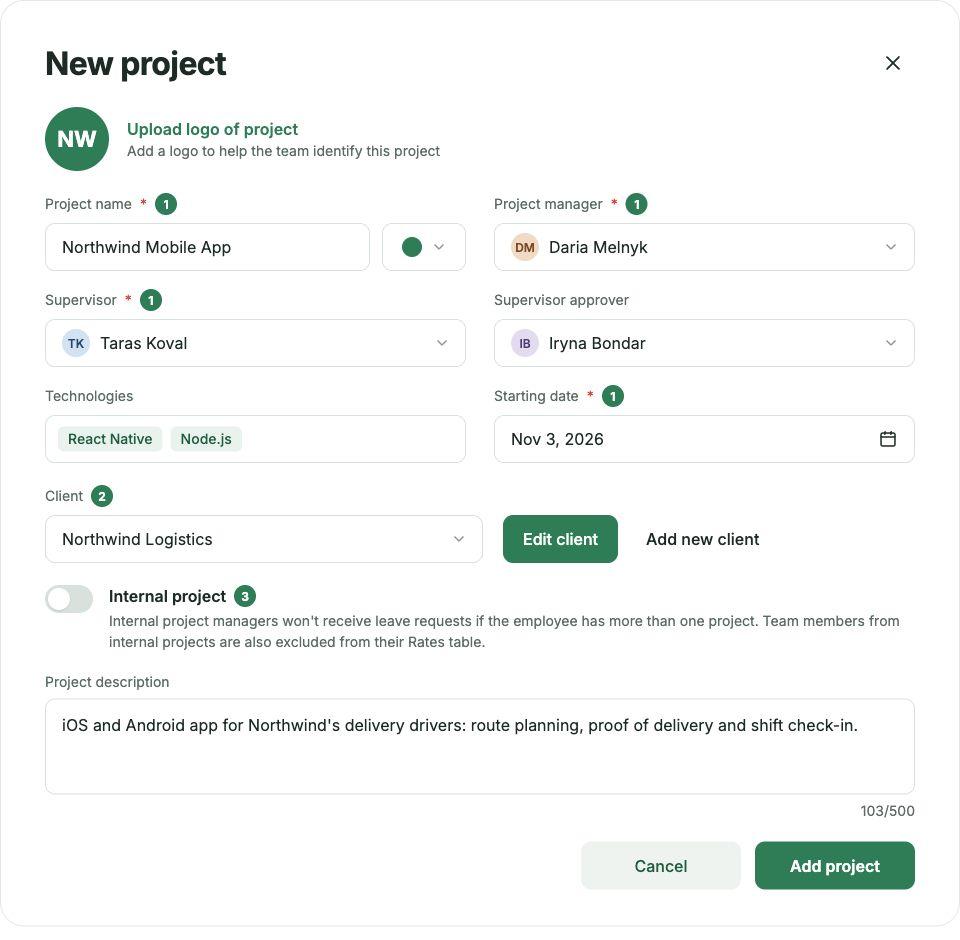
Why a supervisor and a PM? On most teams they're different people. The PM runs the day-to-day; the supervisor is the person who signs off when something goes wrong. Writing both down on day one saves the "who decides this?" conversation later.
Tip: If you run several projects for one client, keep the client name identical across them. It keeps your project list easy to scan.
Day 2 : Assemble the team
Add the people who'll work on the project and give each one a role: Project Manager or Employee. Their avatars appear on the project card, so anyone opening it sees the team at a glance.
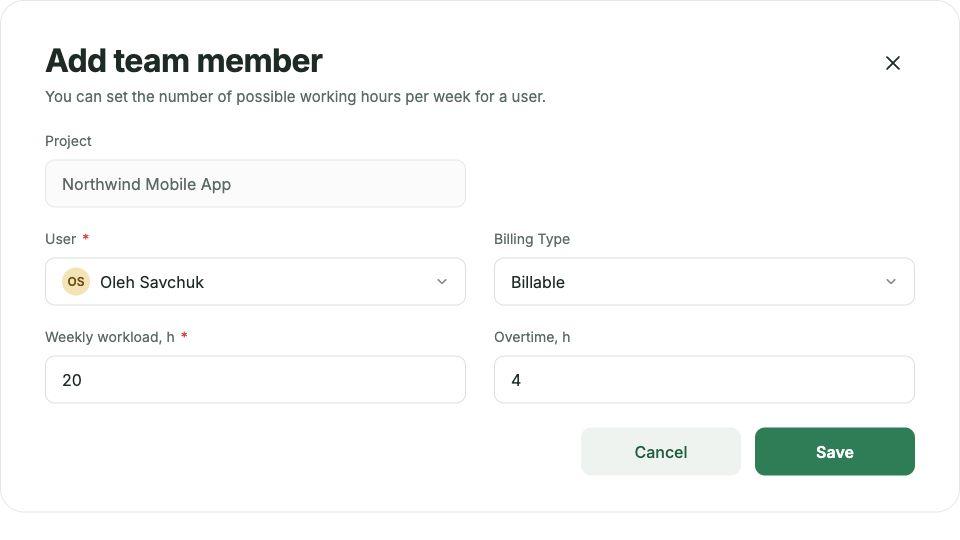
Roles are set per project, not per person. The same designer can be a PM on one project and an Employee on three others, and Kaban keeps both straight. This matters more than you’d think. In most companies of 20–80 people, experienced team members lead one project while contributing to several others, and a single fixed role per person can’t reflect that.
Tip: add everyone who'll log time on the project, including part-timers and people who join for a week. If they're not on the team, their hours won't show up on Friday.
Day 3 : Get to know your people
Before you plan anything, open each team member's profile. This is where Kaban differs from a task tracker: the profile is an HR record and a project map in one.
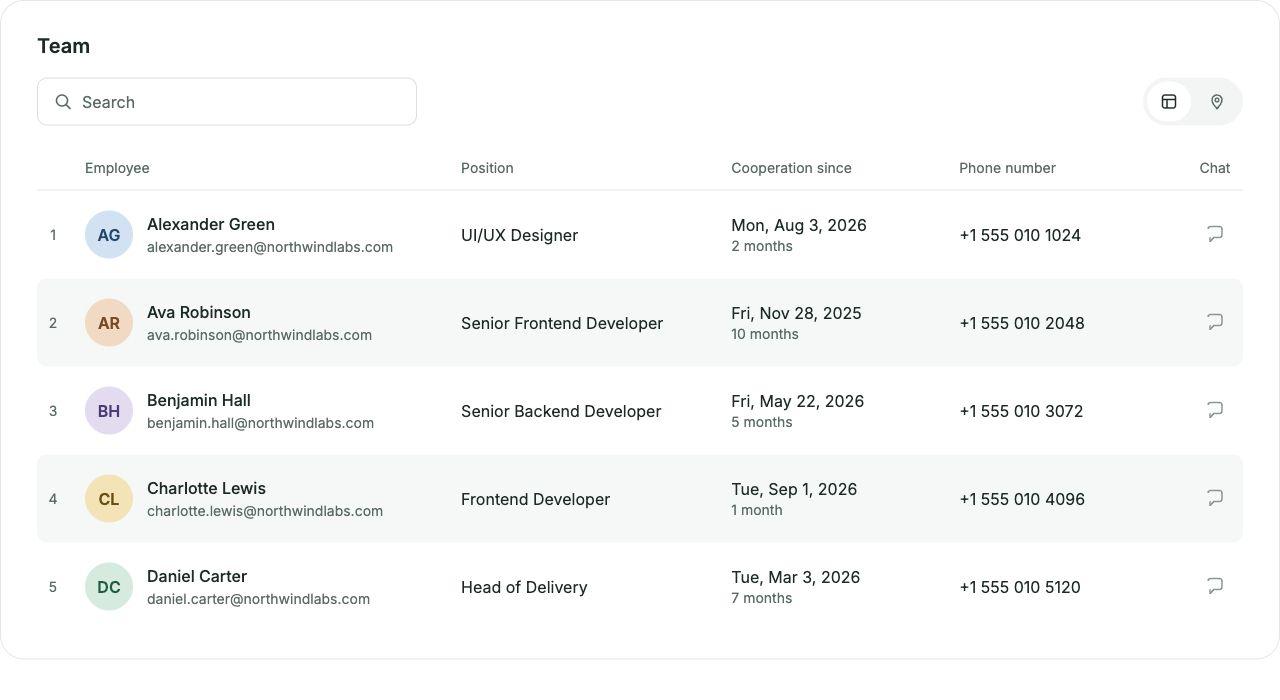
| What you see | Why it matters to a PM |
|---|---|
| Job title and seniority | Whether the task you have in mind fits the level |
| Start date | Someone two weeks in needs more context than someone two years in |
| Location | Time zones and public holidays you'll need to plan around |
| HR contact | Who to talk to about leave, workload or a hiring gap |
| All projects, split by role | How many other projects this person is on, and where they lead |
The last row is the one to dwell on. If a profile shows All projects (4), your project gets a quarter of that person's week at best. That's not a problem to fix on Wednesday. It's a number to plan with.
Day 4 : Set up hour reporting
Estimates tell you what should happen. Hours tell you what did. In Kaban, each person logs their time in a monthly calendar, and the month's norm is calculated for them.
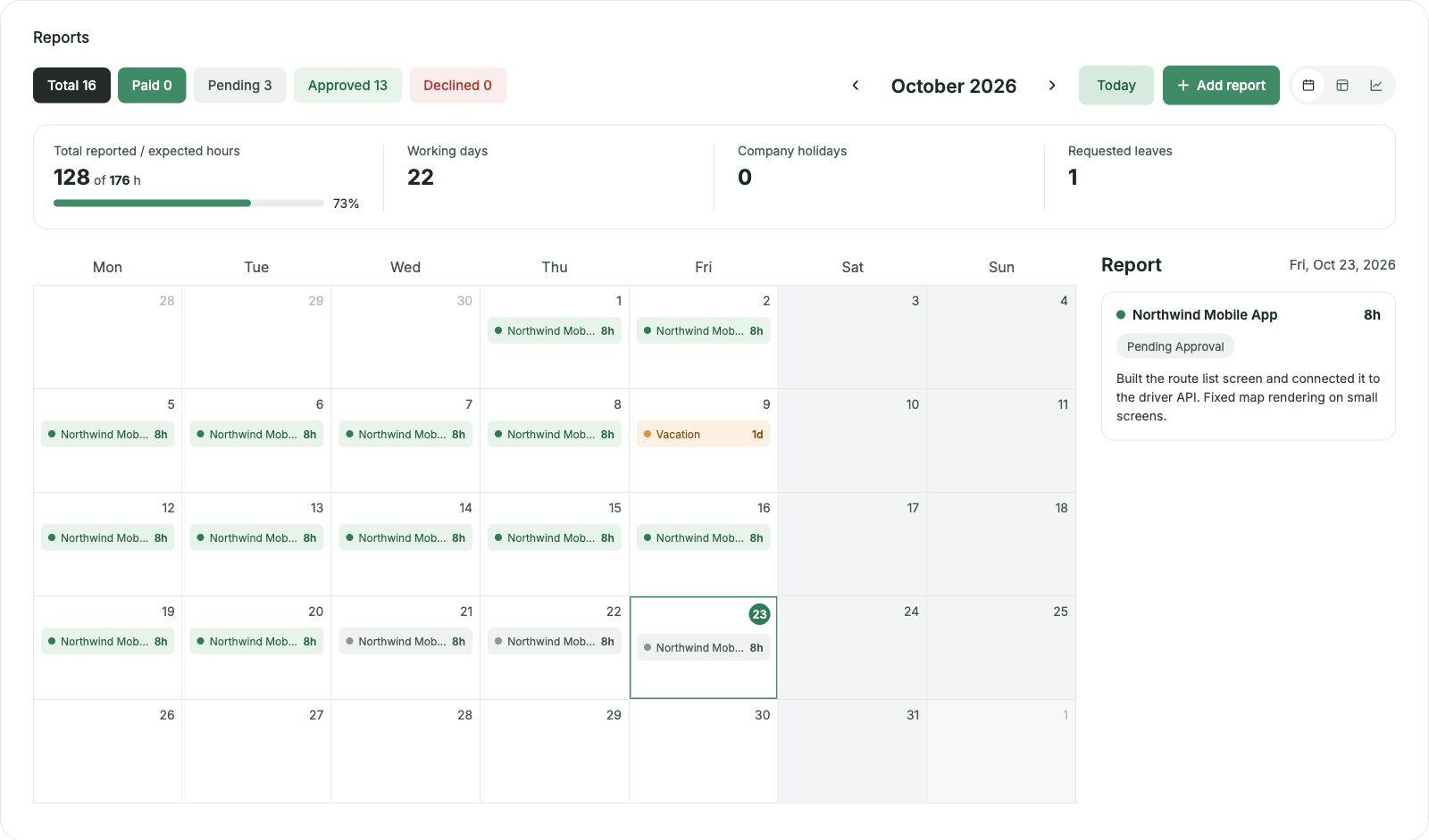
At the top of the calendar, three numbers set the frame for the month:
| Metric | Example | What it means |
|---|---|---|
| Reported / expected hours | 20 | Weekdays minus company holidays |
| Company holidays | 1 | Days off for everyone, already excluded from the norm |
You don't calculate the norm or remember the holidays. Kaban subtracts them, so 160 hours means 160 hours people can actually work. What to agree with the team today:
- When to log. Daily works best. Weekly is the minimum; by Friday nobody remembers Tuesday.
- What counts as project time. Meetings, reviews, onboarding a new teammate. Decide now, or you'll be declining reports on Friday.
- What a full day is. The calendar suggests 8 hours a day. If your team works differently, say so.
Day 5 : Your first review
Friday is where the week pays off. Open the reports, check what the team logged and decide on each entry. Every report moves through four statuses:
| Status | What it means |
|---|---|
| Pending | Logged by the team member, waiting for review |
| Approved | Checked and confirmed |
| Declined | Sent back to be corrected |
| Paid | Paid out at the end of the month |
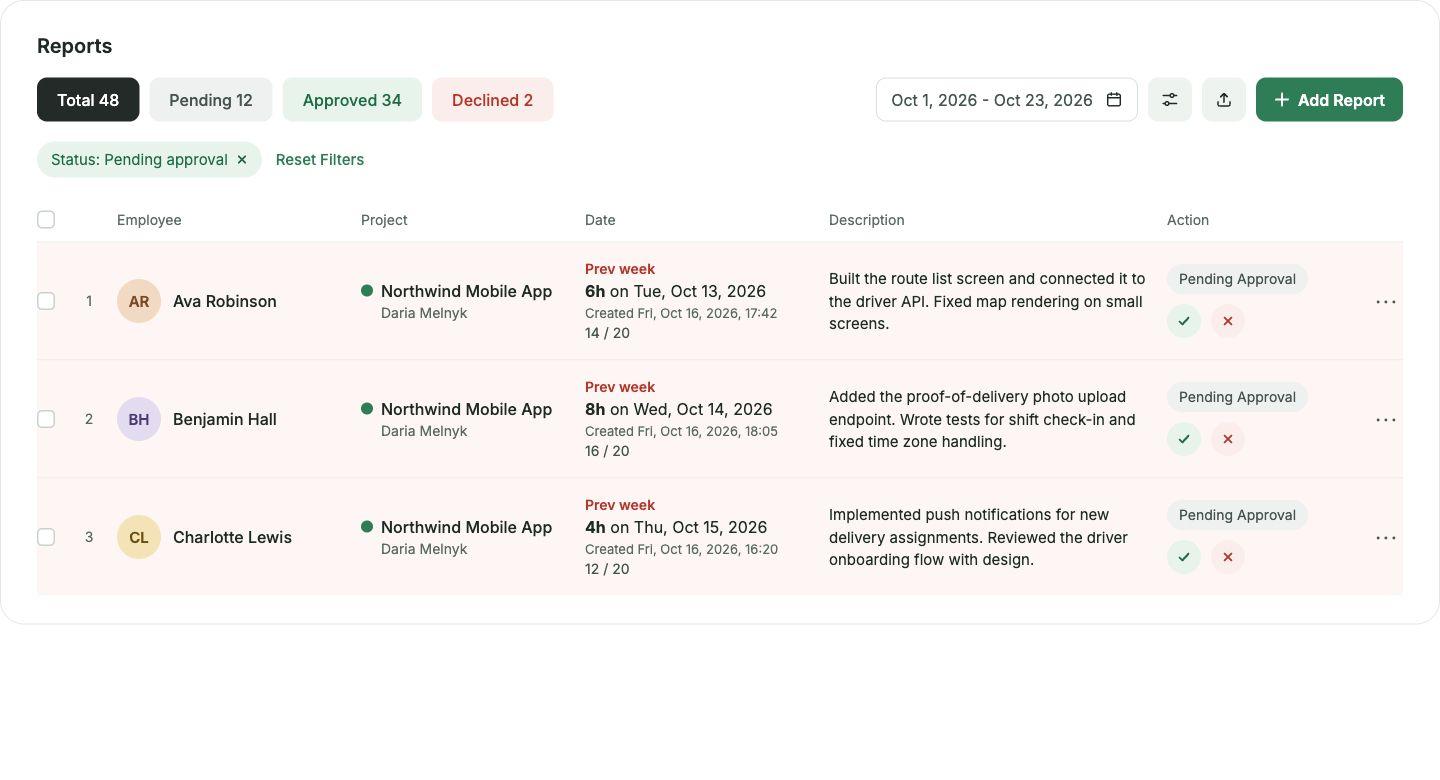
Then look past individual entries at the pattern. Reported hours set against the norm say more than any status update:
| What you see | What it may mean | What to do |
|---|---|---|
| Far below the norm mid-month | Hours not logged yet, or the person was pulled onto another project | Check their profile (Day 3), then ask |
| Above the norm | Overtime, or scope growing quietly | Look at what the extra hours went to |
| Many declined reports | The team isn't sure what counts as project time | Revisit the rules from Day 4 |
| Everyone exactly at the norm | Hours filled in to match, not logged as worked | Ask for daily logging |
Fifteen minutes of this every Friday replaces the end-of-month chase for missing timesheets. Month-end: The timesheet that's already done If you've reviewed every Friday, the last day of the month is short. The approved hours are already the month's timesheet. Once they're paid out, they move to Paid, and the month is closed.
| Without Kaban | With Kaban | |
|---|---|---|
| Collecting hours | Chasing people for spreadsheets on the last day | Logged daily in one calendar |
| Checking them | One long review of the whole month | Fifteen minutes every Friday |
| Holidays and leave | Subtracted by hand, sometimes forgotten | Company holidays already excluded from the norm |
| Handing over to accounting | Merging files and fixing formats | Approved hours, ready to pay |
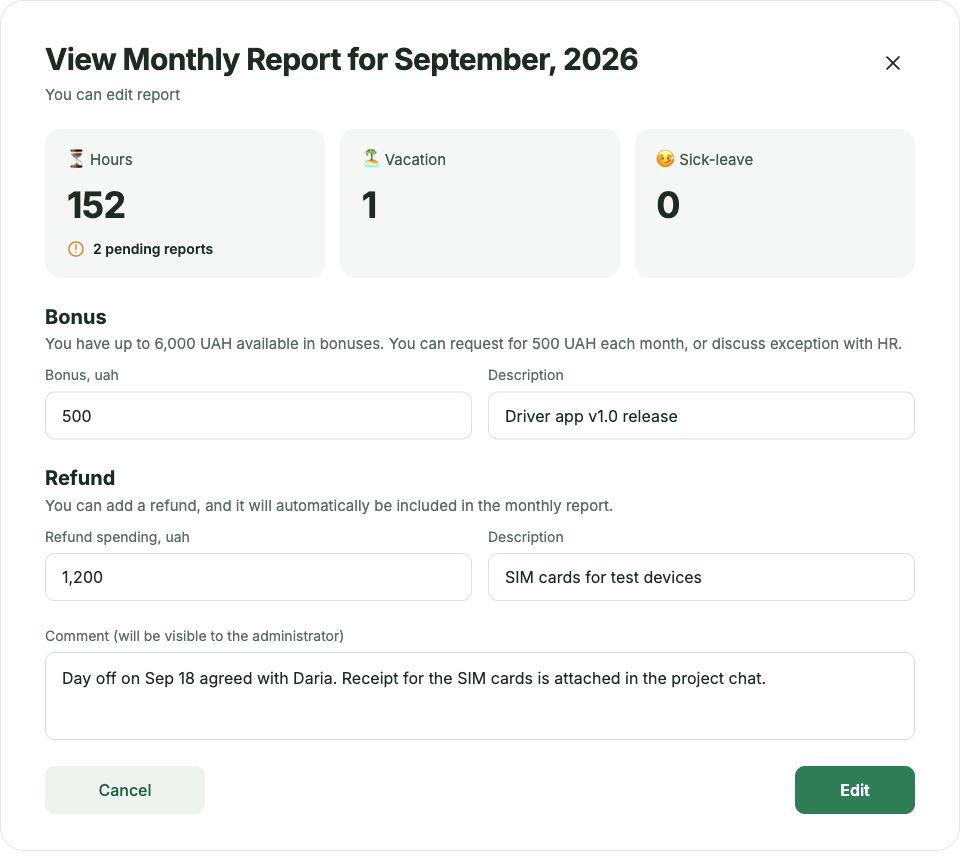
One honest note: Kaban prepares payroll-ready data. Running payroll itself inside Kaban is on the roadmap, not live yet.
What’s next: Boards and tasks
With your projects set up, the next step is to bring day-to-day work into them. Boards and tasks in Kaban live inside the projects you’ve just created, so this week’s setup carries straight over: the same team, the same roles, the same hours, now tied to tasks. Your first-week checklist
- Project created with client, supervisor, PM, start date and status
- Everyone who logs time added to the team, with a role
- Each profile checked for other projects and planned leave
- Logging rules agreed: when, what counts, what a full day is
- First Friday review done: reports approved or declined
- A recurring 15-minute Friday slot in your calendar