How to Track Team Workload Without Chasing Every Lead
Some of your team is overloaded, some is waiting for work, and status meetings won't tell you which. How to read workload from hours, projects and leave.


Lead: Ask any lead how their team is doing, and the answer is "busy". It is usually true, and it tells you almost nothing about who is overloaded, who has room and where the next problem will come from.
In most teams of 30 to 60 people, workload is uneven. A few people carry two projects and stay late. A few others finish early and wait for the next task. Both cost you money: the first group burns out and leaves, the second is paid for hours that don't go anywhere. The owner is usually the last to see it. Leads report on their own teams, people don't like to say they are overloaded, and nobody likes to say they have nothing to do.
This article shows how to read your team's workload from data you probably already have, and how to check it in 15 minutes a month instead of a round of one-on-ones with every lead.
Key takeaways
- "Busy" is a feeling. Hours against a norm, split by project, is a number you can compare.
- One month tells you little. Look at three months to see who is consistently over or under.
- Uneven workload is usually a planning problem, not a people problem.
Why asking leads doesn't give you the picture
Your leads are not hiding anything. The way the question travels just loses most of the information.
- Each lead sees one slice. A developer who splits time between two projects looks half-loaded to each PM, and fully loaded to nobody.
- "Busy" means different things. For one lead it means 45 hours a week. For another, it means a lot of meetings and a slow sprint.
- People underreport overload. Few employees tell their lead they can't keep up, especially in a small team where everyone is visibly working hard.
- Idle time is even harder to admit. Someone waiting for the next task will rarely say so. They will look for something to do, and it may not be what you need.
- Leave and holidays are left out. A team of eight with two people on vacation is a team of six, but the plan for the week often assumes eight.
The result: the owner gets five confident answers that don't add up to a picture.
Four signals that show real workload
You don't need a resource planning system to see workload. Four numbers, looked at together, show most of what you need.
1. Hours against the monthly norm
The norm is how many hours a person is expected to work this month: working days minus holidays, times the standard day. Compare it with the hours they actually logged.
A person at 100% of the norm is fully loaded. At 120%, they are working overtime. At 70%, either they have spare capacity or they are not logging everything. Both are worth knowing.
2. Hours split by project
Total hours show how much someone works. The split shows where it goes. Someone at 100% of the norm across four projects is in a very different place from someone at 100% on one.
This is also where you see which projects quietly take more hours than planned, and which client is getting more of the team than the contract covers.
3. Leave and holidays
Capacity is not headcount. Before you look at next month, subtract planned leave and public holidays. A team that was fine at full strength can be overloaded in a month when two people are on vacation.
4. The trend over three months
One heavy month is normal: a release, a deadline, a sick colleague. Three heavy months in a row is a pattern. The same goes for low months. Look at each person over a quarter before drawing conclusions.
How to read the numbers
The same few patterns show up in almost every team. Here is what each one usually means and what to do about it.
| What you see | What it often means | What to do |
|---|---|---|
| Above 110% of the norm for three months | Overload. A burnout or resignation risk | Move one project or part of one to someone else. Talk to the person before they talk to you |
| Below 80% of the norm for three months | Spare capacity, or hours not being logged | Ask first. If it is capacity, it is cheaper than a new hire |
| Hours spread across four or more projects | Constant context switching, slower work on all of them | Reduce to two or three projects where possible |
| One person logs most of a project's hours | A key-person risk. If they leave or get sick, the project stalls | Add a second person, document the setup in the wiki |
| A project takes more hours each month with the same scope | Scope creep or an estimate that was off | Review with the PM and, if needed, with the client |
| The whole team is above norm in a month with planned leave | Capacity was planned for full headcount | Plan next month from available hours, not headcount |
One rule before acting on any of these: talk to the person and their lead first. The numbers tell you where to look, not what happened.
A 15-minute monthly review
Do this in the first week of each month, once last month's hours are approved.
- Open last month's hours against the norm, for everyone. Mark anyone above 110% or below 80%. (3 minutes)
- Compare with the two months before. Keep only the names that show up again. Those are your real signals. (3 minutes)
- Look at hours by project. Note any project that grew, and anyone spread across four or more. (3 minutes)
- Check next month's leave and holidays. Which teams will be short, and when? (2 minutes)
- Write down two or three questions for your leads. Not "how is the team?", but "Anna has been at 125% since August, can we move the reporting work?" (4 minutes)
That last step is the point. You still talk to your leads, but you come with specific questions instead of a general one, and you get specific answers.
Tip: Keep a simple note month to month: the names you flagged and what you decided. In three months, it shows whether your changes worked.
Where Kaban fits
The review above takes 15 minutes only if the data is in one place. When hours live in a time tracker, leave in an HR system and projects in a spreadsheet, the same review takes an afternoon of exports.
In Kaban, the four signals come from the same workspace:
| Signal | Where you see it in Kaban |
|---|---|
| Hours against the norm | Reports: each person's logged and approved hours for the month, against the monthly norm your company sets |
| Hours by project | Projects: hours logged on each project this month and who logged them, so PMs and owners see the load per project |
| Leave and holidays | Leave management: who is out and when, with public holidays you add for your countries |
| The trend | Reports for previous months, kept for every person |
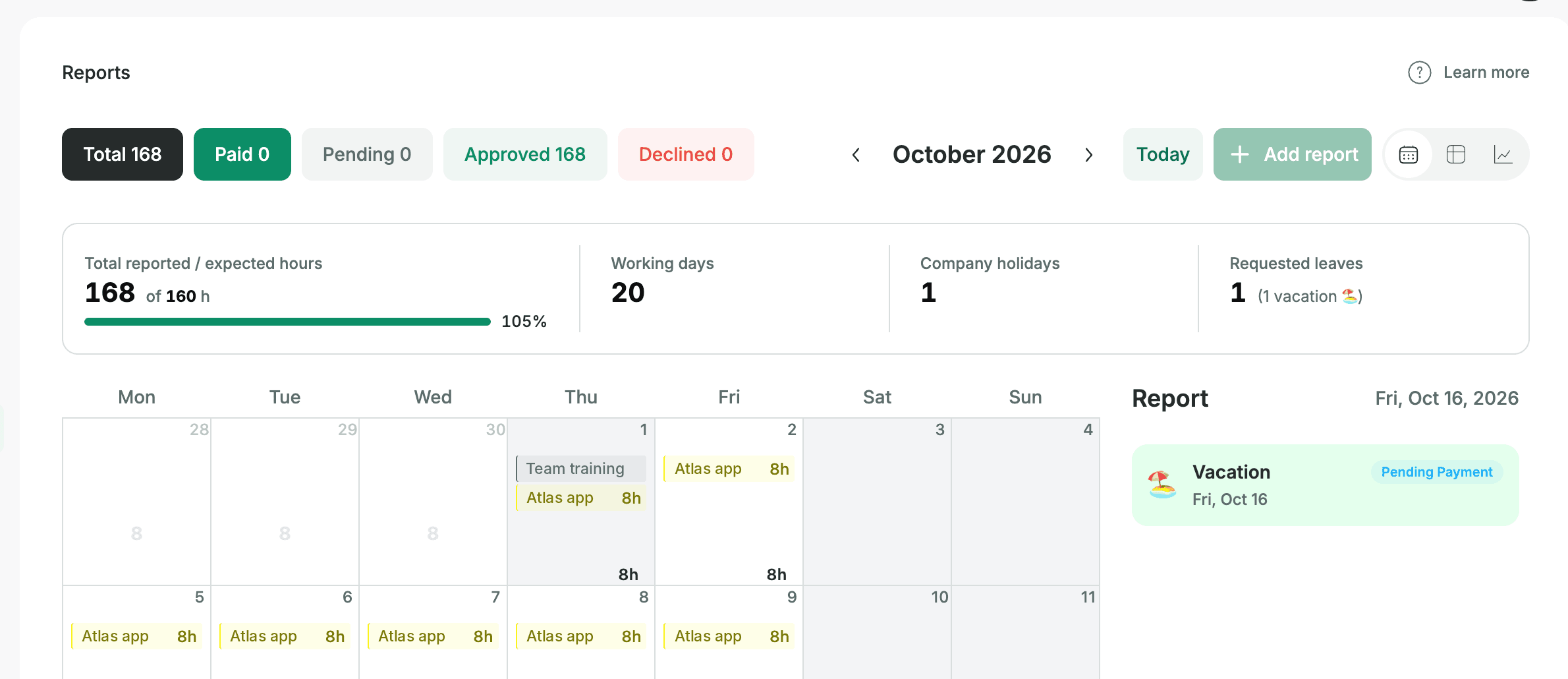
Because leave and hours share one list of people, a person on vacation for a week doesn't show up as "underloaded". The norm and the leave are already in the same picture.
An honest note on what this is and isn’t. Kaban shows workload from logged hours, so the workload view reflects what already happened, not plans for the weeks ahead.
For what’s coming up, you can look at the task boards to see who has what in progress and what’s queued next. Just keep in mind that a busy board isn’t the same as an hour forecast. And like any hour-based view, it’s only as good as the logging, so the first month is often about getting everyone to log consistently.
